
Thin Client
In the ThinClient configuration, set basic options and create shortcuts to applications and devices.
Configuration
| Setting |
Value |
Explanation |
| Name | Valid hostname |
Use of the name:
|
| Description | Text | Informative text |
| MAC address |
MAC address |
openthinclient uses the MAC address as the unique ID of the thin client. If the PXE service policy is set to "All PXE Clients via the Default Profile," use the MAC address |
| Location | Defined Locations |
The location of the thin client. All settings made in the location configuration are applied by the thin client. |
| Hardware Type | defined hardware types |
The thin client applies all settings made in the hardware type configuration. |
Startup options (Advanced settings — apply with care!)
| Setting |
Value |
Explanation |
| NFS Server |
Override the site's startup options for this thin client. Leave these fields blank to take full advantage of openthinclient's functionality. This feature may be removed in a future version. |
|
| NFS share name |
||
| TFTP Boot Server |
||
| Manual kernel specification | Override the advanced settings for the hardware type of this thin client. | |
| Additional kernel parameters | ||
| Manual specification of the initrd | ||
| Log Level |
Configure logging as required. INFO WARNING ERROR |
Sets the log level for openthinclient applications. The log output can be viewed in the Log Viewer, among other places. Note, excessive logging can impair the operation of the ThinClient. Set the log level only for active troubleshooting. |
| Custom Folder |
Enable Disabled |
Disable the Custom folder when troubleshooting. |
| Debug mode for startup |
Start normally Debug init script Start without X-Windows, console only Debug init and no X |
Advanced settings for debugging boot problems. Enabling these options prepares the system for diagnostic work. Debug init script: Stops the execution of the In the shell, use Start without X: Start without the X Window System |
Custom variables
| Setting |
Value |
Explanation |
|
$CUSTOM1 $CUSTOM2 $CUSTOM3 |
Any values |
Link any strings to the ThinClient here. These strings are available on the ThinClient as environment variables. |
Special actions on the ThinClient

|
|
Description |
|
|
Send a Wake-On-LAN packet to the ThinClient’s MAC address. |
|
|
Restart the thin client. |
|
|
Shut down the thin client. |
|
|
Displays the IP address of the ThinClient at the last boot. Click the IP address to copy it to the clipboard. |
|
Reapply settings |
This performs the following actions:
|
|
|
Open a new browser window with a VNC viewer on the thin client. Assign the Remote Connection (VNC) application to the thin client or user. After a successful login, launch the Remote Connection (VNC) application. |
|
Log Viewer |
Displays the latest log entries for the thin client. |
|
Delete Thin Client Profile |
Deletes the thin client profile. |




ThinClient Overview
On the overview page, view and manage all configured thin clients.
Filter
Use the filter bar to control which ThinClients appear in the overview.
ThinClients are displayed if at least one of the following properties partially matches:
- Name
- Description
- IP Address
- MAC address
Display
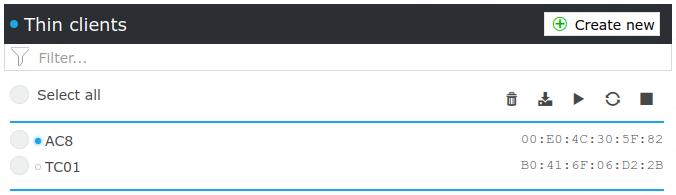
The following properties are displayed in the overview:
- Checkbox, ThinClient selection for specific actions
- Online status, a circle indicating whether the thin client is active (blue) or inactive (gray).
To determine the online status, the thin client regularly sends a heartbeat signal to the server via HTTP over port
8080. - Name
- Description
- MAC address
Actions
Perform the following actions with the selected thin client:
|
Action |
Explanation |
|
|
Delete the selected thin clients. |
|
|
Export the selected thin clients with no assignments, e.g., applications or components. |
|
|
Send Wake-On-LAN packets to the MAC addresses of the selected thin clients |
|
|
Restart the selected thin clients. |
|
|
Shut down the selected thin clients. |
 Delete
 LDIF Export
 Wake-On-LAN
 Restart
 Shut Down